How does the GL Reconciliation work in Konsise
Konsise allows you to perform your VAT Control Account reconciliation within the system.
The GL Reconciliation can be found under the Determinations tab:
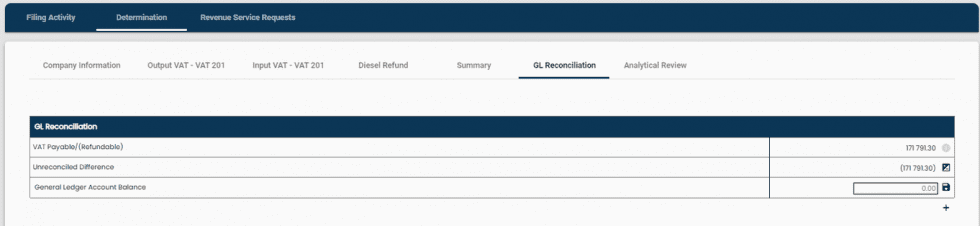
This value is pulled through from the Summary tab – its the value that has been submitted as per your VAT201 return.

Here you will capture the value as per your VAT Control GL Account. Click ‘Save” to save your balance.

A debit balance should be captured as a positive.
A credit balance should be captured as a negative.
This represent the difference between the VAT Payable/ (Refundable) that hasn’t yet been reconciled. As reconciling line items are added, this difference is adjusted accordingly.
To reconcile the difference between the VAT Payable/ (Refundable), you can create reconciling line items to explain the difference.
Click on the + underneath the GL Reconciliation table:

A line is created just above the ‘General Ledger Account Balance’ line:

Capture the reason for the reconciling line difference as well as the value and click ‘Save’ (see example captured below):

You can add as many lines as necessary to explain the differences. Click on the trash can icon to delete any lines:

Related Articles
How does the review and sign-off work?
Internal controls are important to an organisation as they ensure that any errors are detected timeously. The processes around preparing, reviewing and submitting a tax return are pivotal to an organisations ability to ensure compliance of tax ...How does the review and sign-off work?
Internal controls are important to an organisation as they ensure that any errors are detected timeously. The processes around preparing, reviewing and submitting a tax return are pivotal to an organisations ability to ensure compliance of tax ...Sync between Konsise and SARS
Please note: This process will only occur once Konsise has been activated as an ISV on SARS eFiling Follow the steps below to finalize the sync process: Go to “Connections” on the top navigation bar: Click on Create Revenue Service Connection Select ...What reports & trackers does Konsise provide?
Reports & Trackers There are 2 types of reports available in Konsise: Compliance Report This report shows the status of all your filings compliance across all tax types & companies, for a defined period: Corporate Income Tax Report The Corporate ...What reports & trackers does Konsise provide?
Reports & Trackers There are 2 types of reports available in Konsise: Compliance Report This report shows the status of all your filings compliance across all tax types & companies, for a defined period: Corporate Income Tax Report The Corporate ...