Version 20.7.5 Date: 9 May 2025
We’re excited to share the latest Konsise improvements in Version 20.7.5, which was rolled out on Friday, 9 May 2025. This update is packed with usability enhancements and behind-the-scenes fixes based on user feedback
Key Improvement: IRP6 Bulk Submission Filter
We heard your frustration loud and clear. Previously, the period filter on the IRP6 bulk submission table only showed submissions up to the current date, which was not very helpful if you’re working ahead. Now, the filter will include all submissions due up to the end of the current month. For example, in May, you’ll see all submissions due until 31 May, giving you a full picture of what’s coming up without needing to adjust the filter each time.

Entity Management: Smarter Search for Assignments
We’ve made it easier to find what you’re looking for when assigning entities. The search function within Entity Management will now look across all entities, regardless of whether they are listed under Entity Management or Tax Management.
Filing Name Display Expanded
You asked, we delivered. The Filing Name field is now more visible across the platform:
- Added to the Tax Filing Details on a card (where utilised)
- Added as a column in the VAT exceptions and PAYE exceptions dashboards
- Added as a column on the Tax Filing Master Data Report
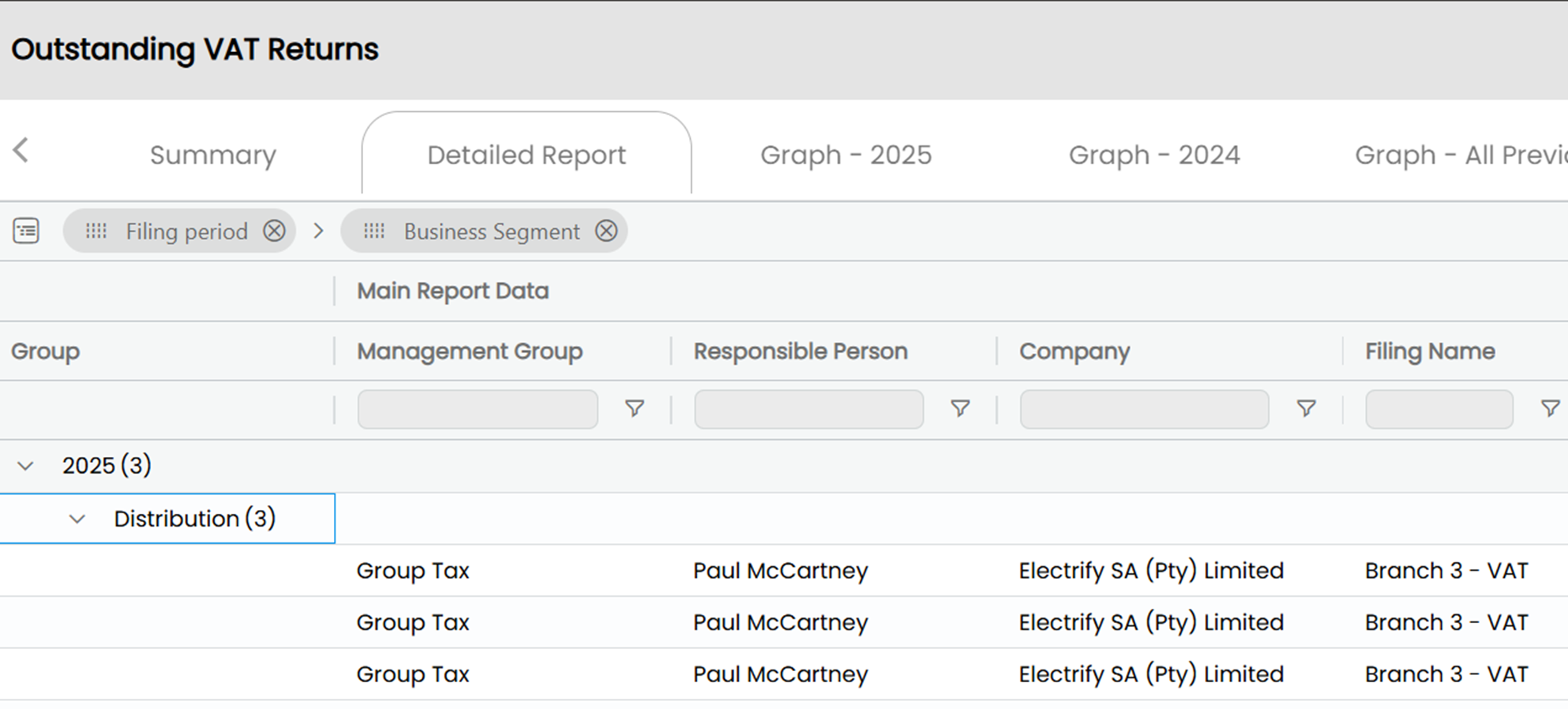
This should make tracking and reporting even easier.
Connections Page: Expand/Collapse Functionality
Navigating the integrations on the Connections page just got simpler with expand/collapse buttons to help you manage your view with ease.

Master Data Enhancements
New View Icon for Non-Admins: Previously, non-admin users saw an “edit” icon they couldn’t use. We’ve updated it to a “view” icon to remove any confusion.
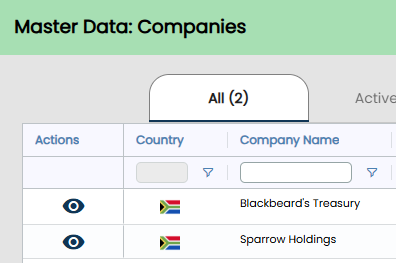
Better Sorting: The financial year-end sort on the Entity Master Data report now follows calendar order, not alphabetical, so your reports make more intuitive sense.
General Improvement
- We’ve completed rebranding all references from “Tax Card” to “Filing Card” across the platform, including trackers, dashboards, reports, and inboxes, to reflect the purpose of these cards better.
- Tooltips have been added to the Totals dashboard and compliance report statuses, offering more context at a glance.
- Spelling errors under the Configuration tab have been fixed.
- Configuration sections are now sorted alphabetically for easier navigation.
Bug Fixes: Making Things Run Smoother
We’ve resolved several bugs, many of which were raised by clients. These include:
- Errors when opening a request card from Request Tracker
- Request: The Workflow board is not loading/ taking too long to load
- Errors when opening a request card from the Request Workflow board
- Errors when opening a request card from the tax filing card
Client Grouping Tab:
Inbox for the Client Grouping Tab now correctly matches what you see in the Revenue Service Correspondence inbox
PDF Generation Issues:
- Submission PDF on Submission and Payment tab – fixed
- Rebates and medical scheme credits and expenses were not displaying on the IRP6 PDF, this has been fixed
- YoA displaying on the PDF for the first provisional tax was incorrect - this has been fixed
We appreciate all your feedback and bug reporting. Every suggestion helps us deliver a better Konsise experience.
If you have any questions about this release or need support, feel free to contact your Konsise account manager or our support team.
Related Articles
Version 25.0.9 Date: 15 May 2026
Our latest release focuses on administrative flexibility and data precision. In this update, we have expanded our suite of editable compliance documents to give you greater control over layout amendments, closed critical gaps in multi-party share ...Version 21.0.1 Date: 30 May 2025
We’ve just launched a brand-new version of Konsise packed with helpful features and a few quality-of-life improvements, many of which our users directly requested. Here’s what’s new in this latest release: IRP6 Calculation Improvements for ...Version 20.10.0 Date: 16 May 2025
We’ve rolled out a fresh update that includes some small but mighty improvements, most of them driven by direct feedback from our users (thank you!). Here’s what’s new in version 20.10.0: New “Difference” Column in Filing & Payment Trackers We’ve ...Version 25.0.6 Date: 8 May 2026
Our latest updates mark a major leap forward in both security and historical accuracy. We have transitioned the platform to a more robust development framework, reinforced our security protocols through extensive penetration testing, and introduced ...Version 20.4.0 Date: 2 May 2025
We’ve just rolled out our latest Konsise update, and while it’s packed with helpful behind-the-scenes improvements, we’ve also added a few upgrades that our users will notice right away. Here's what’s new in Version 20.4.0. VAT201 Enhancements We’ve ...